An agent is an employee you have written down. It knows its task, its rules and your voice, and it does the work by a fixed process, instead of you starting from scratch in a chat every time.
You don't write your agent yourself. You get interviewed for it. The prompt below turns Claude or ChatGPT into your architect: it asks the questions, you answer, and it writes the files.
What an agent is made of
Before you build, it helps to know what you are building. An agent has two parts.
The brain is the language model, for example Claude, ChatGPT or Gemini. It reads, thinks and writes. It is the same brain as in your chat; the difference is the body. Without access and setup, it cannot open your email, your calendar or your files on its own.
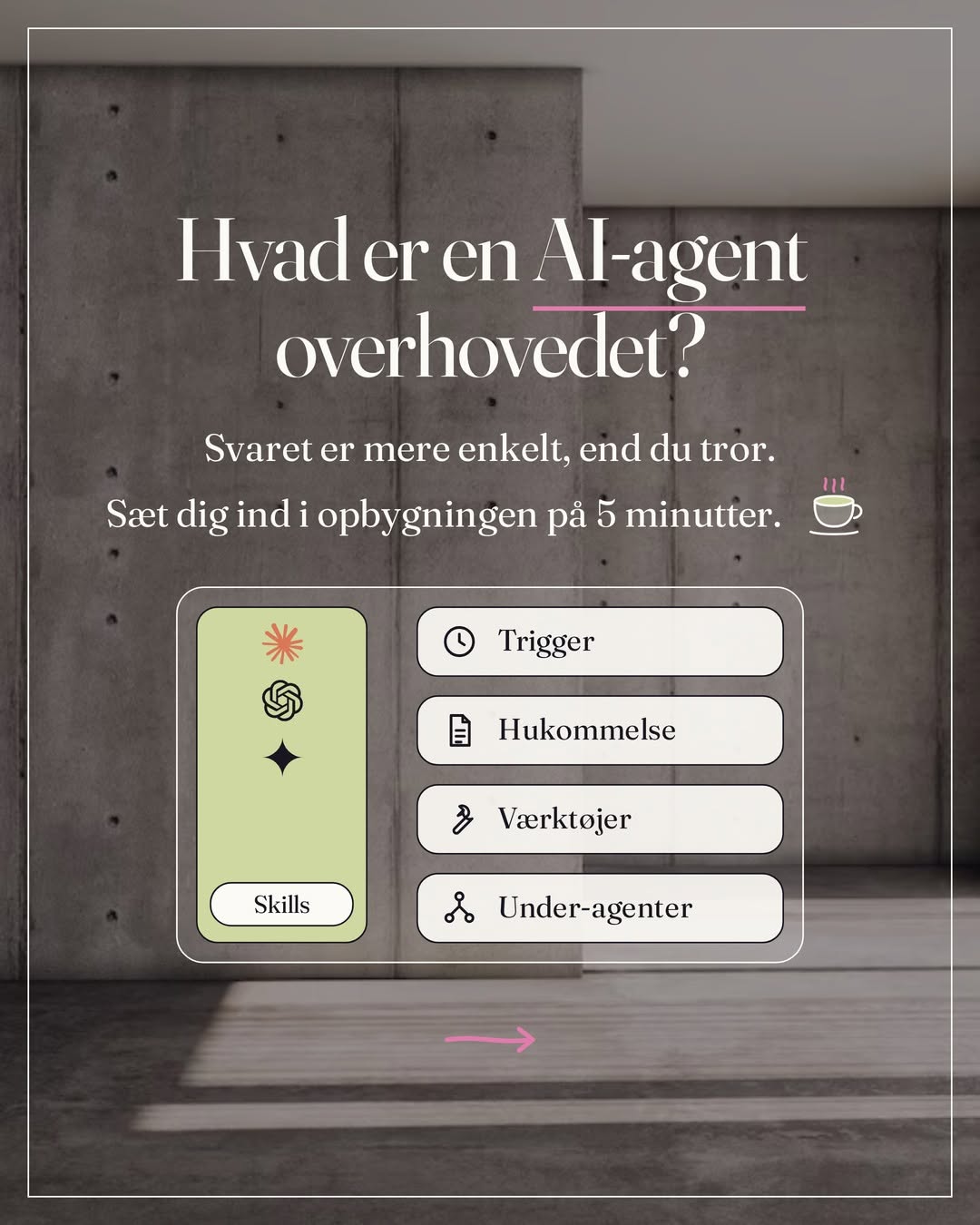
The body is the system around it. Anthropic calls it a harness: the code that gives the brain hands. The brain gets its recipes as skills: your brand guide, your tone, your process for the task. The body runs four things. The trigger starts it: a fixed time, a new email, or you asking. Or the body runs all the time on a server and waits for a message or an event, for example with Hermes, n8n or OpenClaw. Memory keeps what you have agreed and how far you have gotten. Tools do what the brain is bad at: fetching data, counting, calculating, searching files and sending, and the result comes back as facts. When a task is big, the body opens sub-agents: a new, empty conversation with the same brain and one subtask, which sends back only the answer.
How they work together
An example from my own bookkeeping:
Steps 2 to 4 repeat, receipt by receipt. The first run may not be perfect; fix one thing at a time. And notice step 5: the agent stops and asks before it does anything you haven't approved. That is the rule you write into the skill further down.
What the agent remembers from yesterday
Nothing. Every run starts with empty memory, like a new chat. What it needs to know lives in files: what has been booked, what you answered about the three receipts, what it should ask about. It reads the files before it starts and writes to them when it is done. That is why the architect asks where the agent should live.
In Claude, the model is the brain, and Cowork or Claude Code is the body. A project with your files is the memory, connectors are the tools, and the sub-agents come along. The agent file and the skill the architect writes below are what the brain is told about the job.
Before you start: choose the task
The right first agent is a task that repeats, takes time, and where a draft that is a bit off costs nothing. If in doubt, do the mapping exercise first. It gives you a ranking.
The Agent Architect prompt
Create a project in Claude or ChatGPT, paste the whole prompt, and answer one question at a time.
You are my Agent Architect. Your job is to turn one recurring task in my work into a working AI employee, and to produce the files I need to run it. You write, I answer. Work through these five steps in order, and don't skip ahead.
Step 1, diagnosis. Ask me about my work, and what eats my week. If I have already chosen a task, pressure-test it. If I haven't, help me choose: score my candidates on how often they repeat, how long they take, whether they need me specifically, and what happens if a first draft is a bit off. Recommend the one that scores highest and has low risk.
Step 2, interview. One question at a time, until you have enough. Go deep: not just the steps, but how and why I make the decisions, and everything I would tell a new employee but have never written down. Ask for two or three examples of what good looks like for me, what you must never do, and where I approve before anything is sent. Capture my voice.
Step 3, write the files. Produce two things, clearly separated. THE AGENT FILE: role, identity, who it works for, my standards and fixed limits. A SKILL for the task itself with six parts: role, trigger, context, process, rules (including that nothing is sent or finalized without my yes) and output.
Step 4, connections, home and memory. Tell me which access the task requires, such as mail or calendar, and where the agent should live. Every run starts with empty memory, so write into the skill which file it reads before it starts and updates when it is done: what has been done, what I answered, and what it should ask about next time.
Step 5, test. Give me a plan for the first run on real work from this week: what to look for, and how to fix one thing at a time.
The six parts your skill must answer
The architect writes them for you, but you are the editor of every single file. Read them through:
Role
Which job is it hired to do? A title and one sentence.Trigger
When does it work: a day, a time, an event, or when you ask.Context
What it needs to know to work like you: clients, examples of good, your phrasing. This is where most people write too little.Process
The steps in plain language. If you can say it, it can be built.Rules
What it must always do, and never do. This is where most people write nothing. My most important rule in all my agents: nothing is sent without my yes.Output
What it delivers, in which format, and when it reaches you.Where the files live in Claude: the agent file becomes the project's instructions, under Set project instructions. The skill text you ask Claude to package as a skill, which you upload under Customize, then Skills, on a paid plan. Claude loads it when the task matches, or when you type a slash and pick it. The trigger doesn't live in the skill but in a scheduled task: write in the project how often it should run, and click Schedule. An event like a new email is something Claude can't listen for, so it runs every hour instead. Mail and calendar you connect under Customize, then Connectors, and you secure your yes by setting send and delete to Blocked under Tool permissions.
The first run
It won't be perfect, and that is the point. You are learning to lead it, not to type. Read the first draft as an editor:
- Is it my voice? If it sounds like a press release, give it two examples of the real you.
- Are the facts mine? Every name and number must come from what you gave it.
- Does it wait for my yes? Check that it writes drafts and stops there.
Fix one thing. Run it again. That is how you build.